안녕하세요.🙍♂️
이번 작업은 플레이어가 Enumy를 처치할 때 와, System Message를 작업해 주었습니다.
먼저 UI 작업을 해주었는데요
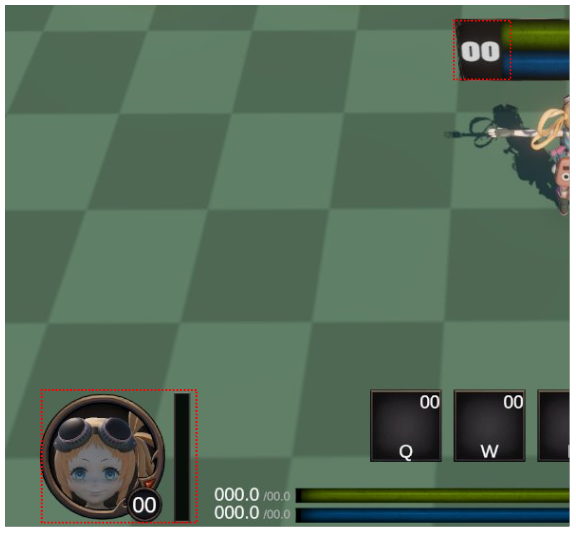
뭔가.. 원하는 디자인 느낌이 안 나서 이것저것 찾아보다가
결국 찾지 못하고, 제가 했던 방식 중에 가장 깔끔한(?) 느낌으로 임시 저장해 두기로 하였습니다.
(디자인적 요소는 차차 업데이트를 하도록 하겠습니다.)
먼저 "PlayerExpBar" 스크립트를 만들어 주었습니다.
using TMPro;
using UnityEngine;
using UnityEngine.UI;
public class PlayerExpBar : MonoBehaviour
{
[SerializeField] private PlayerStats playerStats;
[SerializeField] private Slider playerExpBar;
[SerializeField] private TextMeshProUGUI playerLevelText;
[SerializeField] private TextMeshProUGUI playerWorldBottomExpBar;
void Start()
{
playerLevelText.text = playerStats.playerLevel.ToString();
playerWorldBottomExpBar.text = playerStats.playerLevel.ToString();
}
public void expBarUpdate(float exp)
{
playerStats.playerExp += exp;
while (playerStats.playerExp >= playerStats.playerMaxExp)
{
playerStats.playerExp -= playerStats.playerMaxExp;
playerStats.playerMaxExp *= 2;
playerStats.playerLevel += 1;
playerLevelText.text = playerStats.playerLevel.ToString();
playerWorldBottomExpBar.text = playerStats.playerLevel.ToString();
playerStats.playerStatPoint += 1;
}
playerExpBar.value = playerStats.playerExp / playerStats.playerMaxExp;
}
}
1. 변수와 컴포넌트 입니다.
[SerializeField] private PlayerStats playerStats;
[SerializeField] private Slider playerExpBar;
[SerializeField] private TextMeshProUGUI playerLevelText;
[SerializeField] private TextMeshProUGUI playerWorldBottomExpBar;
- playerStats: 플레이어의 레벨, 경험치, 최대 경험치, 스탯 포인트 등을 담은 데이터
- playerExpBar: UI Slider로 경험치 바를 표시
- playerLevelText / playerWorldBottomExpBar: 플레이어 / 하단에 레벨 표시용 텍스트
2. Start()에서 레벨을 초기화시켜 주었습니다.
void Start()
{
playerLevelText.text = playerStats.playerLevel.ToString();
playerWorldBottomExpBar.text = playerStats.playerLevel.ToString();
}
- 플레이어가 경험치를 얻으면 현재 경험치(playerExp)에 추가
- exp는 외부에서 전달받는 획득 경험치입니다.
3. 경험치 업데이트 함수입니다.
public void expBarUpdate(float exp)
{
playerStats.playerExp += exp;
while (playerStats.playerExp >= playerStats.playerMaxExp)
{
playerStats.playerExp -= playerStats.playerMaxExp;
playerStats.playerMaxExp *= 2;
playerStats.playerLevel += 1;
playerLevelText.text = playerStats.playerLevel.ToString();
playerWorldBottomExpBar.text = playerStats.playerLevel.ToString();
playerStats.playerStatPoint += 1;
}
playerExpBar.value = playerStats.playerExp / playerStats.playerMaxExp;
}
While문을 쓴 이유
Test 과정에서 Enumy의 경험치를 우연히 높게 설정한 적이 있는데, 이럴 경우에도 로직이 한 번만 실행되었기 때문입니다.
- 한 번에 많은 경험치를 얻어서 한 번에 여러 레벨을 올릴 수 있기 때문
- 예: playerExp = 250, playerMaxExp = 100
- 첫 레벨업: playerExp = 150 → 레벨업, playerMaxExp = 200
- 두 번째 레벨업: playerExp = 150 → 레벨업, playerMaxExp = 400
- 만약 if로만 처리하면 한 번에 한 레벨만 올릴 수 있음
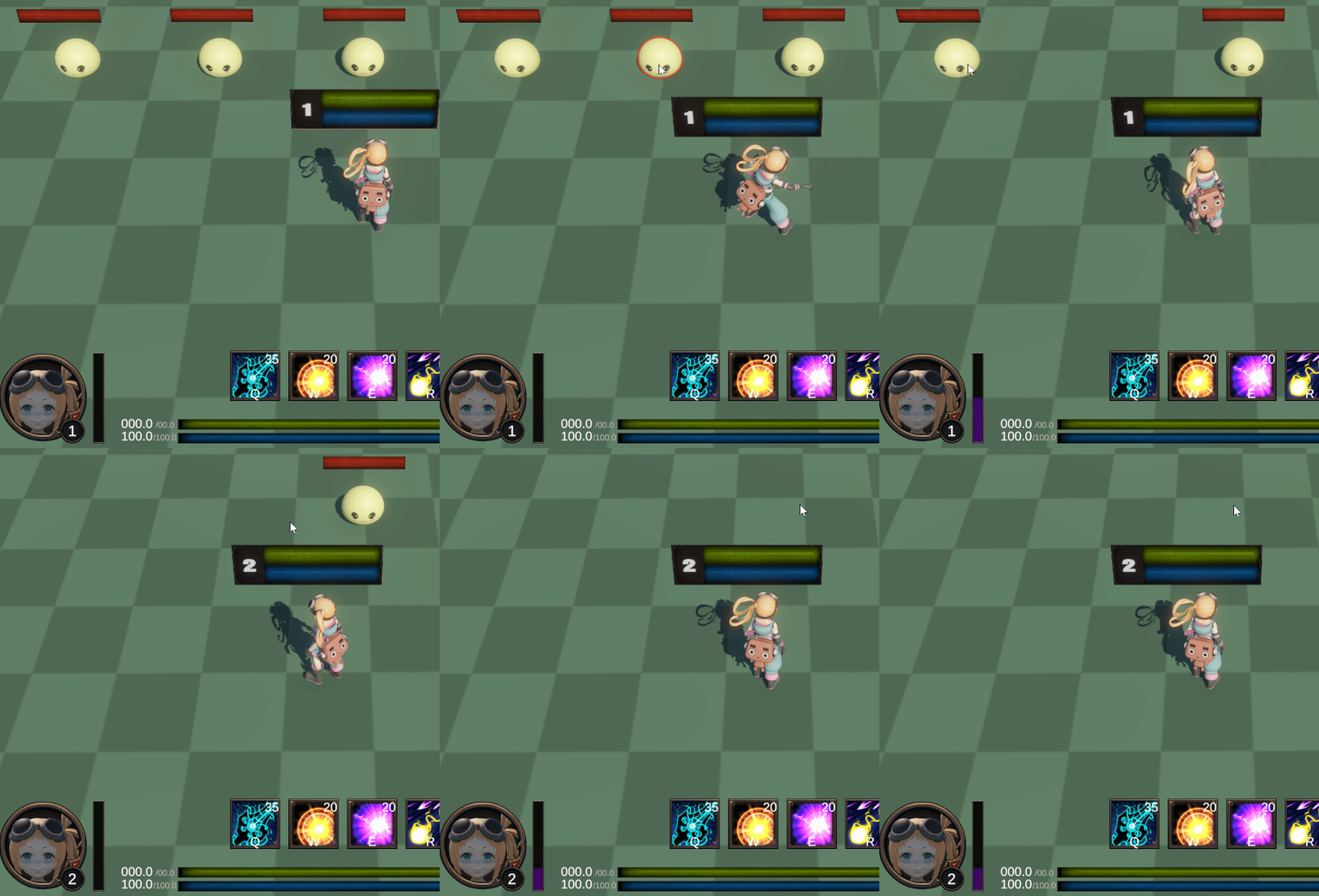
다음은 몬스터를 잡았을 때 골드를 획득하는 스크립트 "GetGoldText"를 만들어 주었습니다.
using System.Collections;
using TMPro;
using UnityEngine;
public class GetGoldText : MonoBehaviour
{
[SerializeField] private GameObject[] goldTextObjects;
[SerializeField] private TextMeshProUGUI[] goldTextObjectTexts;
[SerializeField] private TextMeshProUGUI currentGoldText;
[SerializeField] private float disableTime = 1f;
public void GetGold(string goldText)
{
for (int i = 0; i < goldTextObjects.Length; i++)
{
if (goldTextObjects[i].activeSelf == false)
{
goldTextObjects[i].SetActive(true);
goldTextObjectTexts[i].text = $"+G {goldText}";
currentGoldText.text = (int.Parse(currentGoldText.text) + int.Parse(goldText)).ToString();
StartCoroutine(getTextDisable(goldTextObjects[i]));
break;
}
}
}
private IEnumerator getTextDisable(GameObject goldText)
{
yield return new WaitForSeconds(disableTime);
goldText.SetActive(false);
}
}
1. 변수 선언 부분입니다.
[SerializeField] private GameObject[] goldTextObjects;
[SerializeField] private TextMeshProUGUI[] goldTextObjectTexts;
[SerializeField] private TextMeshProUGUI currentGoldText;
[SerializeField] private float disableTime = 1f;
- goldTextObjects: 골드 획득 팝업 텍스트용 게임오브젝트 배열
→ 풀링(Pooling) 방식으로 미리 생성해 두고 재활용합니다.
- goldTextObjectTexts: 팝업 텍스트의 TextMeshProUGUI 배열.
→ 각 오브젝트에 있는 텍스트를 바로 바꿀 수 있게 연결합니다.
- currentGoldText: 플레이어가 보유한 현재 골드 UI 텍스트.
→ 누적 골드 표시용.
- disableTime: 팝업 텍스트가 화면에 표시되는 시간(초 단위).
2. 골드 획득 함수입니다.
public void GetGold(string goldText)
{
for (int i = 0; i < goldTextObjects.Length; i++)
{
if (goldTextObjects[i].activeSelf == false)
{
goldTextObjects[i].SetActive(true);
goldTextObjectTexts[i].text = $"+G {goldText}";
currentGoldText.text = (int.Parse(currentGoldText.text) + int.Parse(goldText)).ToString();
StartCoroutine(getTextDisable(goldTextObjects[i]));
break;
}
}
}
- 배열을 순회하며 activeSelf == false인 비활성화된 오브젝트를 찾습니다.
- 비활성 오브젝트가 있으면 활성화해서 화면에 나타냅니다.
- +G 100처럼 골드 획득량을 표시합니다.
- $를 사용해 문자열 안에 변수 goldText를 바로 넣습니다.
- 현재 UI에 표시된 텍스트(currentGoldText.text)를 정수로 변환합니다.
- 획득한 골드(goldText)와 더한 뒤 다시 문자열로 바꿔서 UI에 갱신합니다.
- 코루틴을 시작해서 일정 시간(disableTime) 후 오브젝트를 다시 비활성화합니다.
3. 코루틴 함수입니다.
private IEnumerator getTextDisable(GameObject goldText)
{
yield return new WaitForSeconds(disableTime);
goldText.SetActive(false);
}
- WaitForSeconds로 지정 시간 기다린 뒤 오브젝트를 비활성화합니다.
- 이렇게 하면 같은 팝업 오브젝트를 다른 이벤트에서 재활용 가능.
추가로 Message 작업도 같이 구현해 주었습니다.
using System.Collections;
using TMPro;
using UnityEngine;
public class MessageController : MonoBehaviour
{
[SerializeField] private float disableTime = 2.0f;
[SerializeField] private TextMeshProUGUI systemMessage;
private Coroutine messageCoroutine;
public void MessageSetting(string message)
{
if (messageCoroutine != null)
StopCoroutine(messageCoroutine);
systemMessage.text = message;
messageCoroutine = StartCoroutine(DisableTime());
}
private IEnumerator DisableTime()
{
yield return new WaitForSeconds(disableTime);
systemMessage.text = "";
messageCoroutine = null;
}
}
1. 변수 선언부입니다.
[SerializeField] private float disableTime = 2.0f;
[SerializeField] private TextMeshProUGUI systemMessage;
private Coroutine messageCoroutine;
- disableTime: 메시지가 화면에 표시되는 시간(초 단위).
→ 예를 들어 2.0f면 메시지가 2초 후 자동으로 사라집니다.
- systemMessage: UI 텍스트(TextMeshProUGUI) 컴포넌트.
→ 여기에 메시지를 출력합니다.
- messageCoroutine: 현재 실행 중인 코루틴을 참조.
→ 메시지가 연속으로 호출될 때 이전 코루틴을 중단하기 위해 필요합니다.
2. 메시지 설정 함수
public void MessageSetting(string message)
{
if (messageCoroutine != null)
StopCoroutine(messageCoroutine);
systemMessage.text = message;
messageCoroutine = StartCoroutine(DisableTime());
}
if (messageCoroutine != null)
StopCoroutine(messageCoroutine);
systemMessage.text = message;
messageCoroutine = StartCoroutine(DisableTime());
3. 코루틴 (자동 메시지 숨김)입니다.
private IEnumerator DisableTime()
{
yield return new WaitForSeconds(disableTime);
systemMessage.text = "";
messageCoroutine = null;
}
- WaitForSeconds를 사용해 대기 시간을 갖으며 텍스트와 코루틴은 Null로 처리를 해주었습니다.
4. 메시지 호출은 "PlayerSkillController" 스크립트에서 진행해 주었습니다.
if (skill == skills[0] && playerStats.playerMp - playerStats.playerMpQConsumption < 0f)
{
// print("Q 마나 부족");
if (Input.GetKeyDown(KeyCode.Q))
{
messageController.MessageSetting("Not enough mana. Q");
}
playerMpBar.MpBarLimit(0);
if (skill.skillRangeQuadParent.activeSelf)
skill.skillRangeQuadParent.gameObject.SetActive(false);
return;
}
(마나가 부족할 때)
private void HandleSkillCooldown(Skill skill)
{
if (skill.isCoolingDown)
{
skill.currentCooldown -= Time.deltaTime;
if (skill.currentCooldown <= 0f)
{
skill.isCoolingDown = false;
skill.currentCooldown = 0f;
if (skill.skillImage != null)
skill.skillImage.fillAmount = 0f;
if (skill.skillText != null)
skill.skillText.text = "";
}
else
{
if (Input.GetKeyDown(skill.skillKeyCode))
{
messageController.MessageSetting($"Skill not ready. {skill.skillKeyCode}");
}
if (skill.skillImage != null)
skill.skillImage.fillAmount = skill.currentCooldown / skill.cooldown;
if (skill.skillText != null)
skill.skillText.text = Mathf.Ceil(skill.currentCooldown).ToString();
}
}
}
(스킬이 쿨타임중일 때)
현재는 스킬이 쿨타임 중일 때를 우선하여 텍스트가 팝업 됩니다.
작업 요약
1. Enumy 처치 시 Exp 상승, Level Up, Gold 획득
2. 스킬 사용 시 스킬 쿨타임, 마나 부족 System Message 팝업
감사합니다.🙍♂️