안녕하세요.
이번에는 스킬에 마우스 포인터가 올라가면, 간단한 설명이 보이도록 하는 작업을 구현하기로 했습니다.
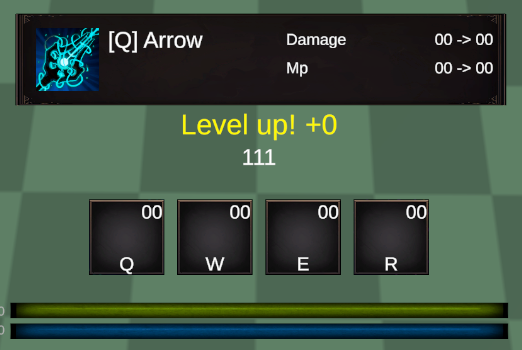
먼저 위 보이는 사진과 같이 사용자가 스킬에 마우스를 올리면
스킬의 간단한 설명 정보창이 팝업 되며
또한 레벨업을 하였을 때 "Level up!"이라는 팝업 될 알림 텍스트도 같이 배치를 해주었습니다.
뒤에 오는 +0의 값 은 플레이어의 스킬 포인트로 넘겨줄 예정입니다.
다음은 새로 생성한 "SkillDiscription"입니다.
using TMPro;
using UnityEngine;
public class SkillDiscription : MonoBehaviour
{
[Header("Component")]
[SerializeField] private PlayerStats playerStats;
[Header("Skill Q")]
[SerializeField] private GameObject skillDiscriptionQ;
[SerializeField] private TextMeshProUGUI damageValueQ;
[SerializeField] private TextMeshProUGUI mpValueQ;
[Header("Skill W")]
[SerializeField] private GameObject skillDiscriptionW;
[SerializeField] private TextMeshProUGUI damageValueW;
[SerializeField] private TextMeshProUGUI mpValueW;
[Header("Skill E")]
[SerializeField] private GameObject skillDiscriptionE;
[SerializeField] private TextMeshProUGUI damageValueE;
[SerializeField] private TextMeshProUGUI mpValueE;
[Header("Skill R")]
[SerializeField] private GameObject skillDiscriptionR;
[SerializeField] private TextMeshProUGUI damageValueR;
[SerializeField] private TextMeshProUGUI mpValueR;
private void Start()
{
skillDiscriptionQ.SetActive(false);
skillDiscriptionW.SetActive(false);
skillDiscriptionE.SetActive(false);
skillDiscriptionR.SetActive(false);
}
public void ShowSkillQ()
{
damageValueQ.text = (playerStats.playerDamage * playerStats.playerSkillQDamage).ToString();
mpValueQ.text = playerStats.playerMpQConsumption.ToString();
skillDiscriptionQ.SetActive(true);
}
public void ShowSkillW()
{
damageValueW.text = (playerStats.playerDamage * playerStats.playerSkillWDamage).ToString();
mpValueW.text = playerStats.playerMpWConsumption.ToString();
skillDiscriptionW.SetActive(true);
}
public void ShowSkillE()
{
damageValueE.text = (playerStats.playerDamage * playerStats.playerSkillEDamage).ToString();
mpValueE.text = playerStats.playerMpEConsumption.ToString();
skillDiscriptionE.SetActive(true);
}
public void ShowSkillR()
{
damageValueR.text = (playerStats.playerDamage * playerStats.playerSkillRDamage).ToString();
mpValueR.text = playerStats.playerMpRConsumption.ToString();
skillDiscriptionR.SetActive(true);
}
public void HideAll()
{
skillDiscriptionQ.SetActive(false);
skillDiscriptionW.SetActive(false);
skillDiscriptionE.SetActive(false);
skillDiscriptionR.SetActive(false);
}
}
1. 변수 선언부입니다.
[SerializeField] private GameObject skillDiscriptionQ;
[SerializeField] private TextMeshProUGUI damageValueQ;
[SerializeField] private TextMeshProUGUI mpValueQ;
skillDiscriptionQ : 스킬 설명이 담긴 이미지 오브젝트입니다.
damageValueQ : 스킬의 현재 대미지입니다.
mpValueQ : 스킬의 현재 mp소모값입니다.
2. 마우스가 오브젝트에 올라왔을 때 실행될 함수입니다.
public void ShowSkillQ()
{
damageValueQ.text = (playerStats.playerDamage * playerStats.playerSkillQDamage).ToString();
mpValueQ.text = playerStats.playerMpQConsumption.ToString();
skillDiscriptionQ.SetActive(true);
}
public void ShowSkillW()
{
damageValueW.text = (playerStats.playerDamage * playerStats.playerSkillWDamage).ToString();
mpValueW.text = playerStats.playerMpWConsumption.ToString();
skillDiscriptionW.SetActive(true);
}
public void ShowSkillE()
{
damageValueE.text = (playerStats.playerDamage * playerStats.playerSkillEDamage).ToString();
mpValueE.text = playerStats.playerMpEConsumption.ToString();
skillDiscriptionE.SetActive(true);
}
public void ShowSkillR()
{
damageValueR.text = (playerStats.playerDamage * playerStats.playerSkillRDamage).ToString();
mpValueR.text = playerStats.playerMpRConsumption.ToString();
skillDiscriptionR.SetActive(true);
}
한 함수로도 대체가 가능할 것으로 생각이 됐지만
설명 표기가 각기 다른 방식 등 확장성을 고려해서 분리를 해주었습니다.
텍스트에 현제 대미지와 현재 마나 소모값이 출력되게 해주는 모습입니다.
3. 마우스가 오브젝트에 벗어났을 때 실행될 함수입니다.
public void HideAll()
{
skillDiscriptionQ.SetActive(false);
skillDiscriptionW.SetActive(false);
skillDiscriptionE.SetActive(false);
skillDiscriptionR.SetActive(false);
}
마우스가 스킬 이미지에서 벗어났을 때 오브젝트를 비활성화하는 로직은 분리를 할 필요가 없을 것으로 판단하여
한 함수로 대체를 해주었습니다.
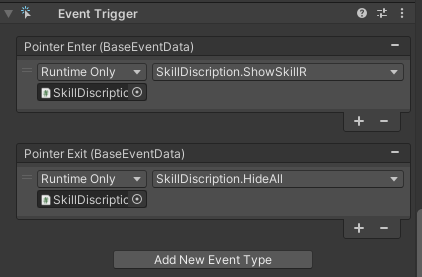
4. 각 함수의 실행은 Event Trigger를 사용하였습니다.
Pointer Enter : 마우스가 있을 때
Pointer Exit : 마우스가 벗어났을 때
다음은 플레이어가 Level Up을 할 때 실행되는 함수 PlayerStatPoint도 만들어 주었습니다.
레벨업을 하여 함수가 호출되면 스킬을 Level up 할 수 있는 버튼이 활성화되며,
버튼에 마우스를 올렸을 때 스킬 설명이 팝업 됩니다.
또한 버튼을 클릭하면 해당 능력치로 업그레이드를 할 수 있습니다.
using TMPro;
using UnityEngine;
public class PlayerStatPoint : MonoBehaviour
{
[Header("Component")]
[SerializeField] private PlayerStats playerStats;
[SerializeField] private TextMeshProUGUI levelUpText;
[Header("Skill Q")]
[SerializeField] private GameObject skillLevelUpQ;
[SerializeField] private TextMeshProUGUI damageValueQ;
[SerializeField] private TextMeshProUGUI mpValueQ;
[SerializeField] private GameObject skillDiscriptionQ;
[Header("Skill W")]
[SerializeField] private GameObject skillLevelUpW;
[SerializeField] private TextMeshProUGUI damageValueW;
[SerializeField] private TextMeshProUGUI mpValueW;
[SerializeField] private GameObject skillDiscriptionW;
[Header("Skill E")]
[SerializeField] private GameObject skillLevelUpE;
[SerializeField] private TextMeshProUGUI damageValueE;
[SerializeField] private TextMeshProUGUI mpValueE;
[SerializeField] private GameObject skillDiscriptionE;
[Header("Skill R")]
[SerializeField] private GameObject skillLevelUpR;
[SerializeField] private TextMeshProUGUI damageValueR;
[SerializeField] private TextMeshProUGUI mpValueR;
[SerializeField] private GameObject skillDiscriptionR;
public void SKillLevelUpBtnPopup()
{
levelUpText.gameObject.SetActive(true);
if (!(maxPointQ >= 5))
{
skillLevelUpQ.SetActive(true);
}
if (!(maxPointW >= 5))
{
skillLevelUpW.SetActive(true);
}
if (!(maxPointE >= 5))
{
skillLevelUpE.SetActive(true);
}
if (!(maxPointR >= 3))
{
skillLevelUpR.SetActive(true);
}
levelUpText.text = $"Level up! +{playerStats.playerStatPoint}";
}
public void LevelUpQ()
{
if (playerStats.playerStatPoint > 0)
{
playerStats.playerStatPoint -= 1;
playerStats.playerSkillQDamage += 0.1f;
playerStats.playerMpQConsumption -= 1;
levelUpText.text = $"Level up! +{playerStats.playerStatPoint}";
maxPointQ += 1;
if (playerStats.playerStatPoint <= 0)
{
levelUpText.gameObject.SetActive(false);
HideAllLevelUpBtn();
}
}
}
public void ShowSkillQ()
{
damageValueQ.text = $"{playerStats.playerDamage * playerStats.playerSkillQDamage} / {playerStats.playerDamage * (playerStats.playerSkillQDamage + 0.1f)}";
mpValueQ.text = $"{playerStats.playerMpQConsumption} / {playerStats.playerMpQConsumption - 1}";
skillDiscriptionQ.SetActive(true);
}
// --------
public void LevelUpW()
{
if (playerStats.playerStatPoint > 0)
{
playerStats.playerStatPoint -= 1;
playerStats.playerSkillWDamage += 0.1f;
playerStats.playerMpWConsumption -= 1;
levelUpText.text = $"Level up! +{playerStats.playerStatPoint}";
maxPointW += 1;
if (playerStats.playerStatPoint <= 0)
{
levelUpText.gameObject.SetActive(false);
HideAllLevelUpBtn();
}
}
}
public void ShowSkillW()
{
damageValueW.text = $"{playerStats.playerDamage * playerStats.playerSkillWDamage} / {playerStats.playerDamage * (playerStats.playerSkillWDamage + 0.1f)}";
mpValueW.text = $"{playerStats.playerMpWConsumption} / {playerStats.playerMpWConsumption - 1}";
skillDiscriptionW.SetActive(true);
}
// --------
public void LevelUpE()
{
if (playerStats.playerStatPoint > 0)
{
playerStats.playerStatPoint -= 1;
playerStats.playerSkillEDamage += 0f;
playerStats.playerMpEConsumption -= 1;
levelUpText.text = $"Level up! +{playerStats.playerStatPoint}";
maxPointE += 1;
if (playerStats.playerStatPoint <= 0)
{
levelUpText.gameObject.SetActive(false);
HideAllLevelUpBtn();
}
}
}
public void ShowSkillE()
{
damageValueE.text = $"{playerStats.playerSkillQDamage} / {playerStats.playerSkillQDamage}";
mpValueE.text = $"{playerStats.playerMpEConsumption} / {playerStats.playerMpEConsumption - 1}";
skillDiscriptionE.SetActive(true);
}
// --------
public void LevelUpR()
{
if (playerStats.playerStatPoint > 0)
{
playerStats.playerStatPoint -= 1;
playerStats.playerSkillRDamage += 0.1f;
playerStats.playerMpRConsumption -= 1;
levelUpText.text = $"Level up! +{playerStats.playerStatPoint}";
maxPointR += 1;
if (playerStats.playerStatPoint <= 0)
{
levelUpText.gameObject.SetActive(false);
HideAllLevelUpBtn();
}
}
}
public void ShowSkillR()
{
damageValueR.text = $"{playerStats.playerDamage * playerStats.playerSkillRDamage} / {playerStats.playerDamage * (playerStats.playerSkillRDamage + 0.1f)}";
mpValueR.text = $"{playerStats.playerMpRConsumption} / {playerStats.playerMpRConsumption - 1}";
skillDiscriptionR.SetActive(true);
}
// --------
public void HideAll()
{
skillDiscriptionQ.SetActive(false);
skillDiscriptionW.SetActive(false);
skillDiscriptionE.SetActive(false);
skillDiscriptionR.SetActive(false);
}
private void HideAllLevelUpBtn()
{
skillLevelUpQ.SetActive(false);
skillLevelUpW.SetActive(false);
skillLevelUpE.SetActive(false);
skillLevelUpR.SetActive(false);
HideAll();
}
}
1. 변수 선언부입니다.
[Header("Skill Q")]
[SerializeField] private GameObject skillLevelUpQ;
[SerializeField] private TextMeshProUGUI damageValueQ;
[SerializeField] private TextMeshProUGUI mpValueQ;
[SerializeField] private GameObject skillDiscriptionQ;
skillLevelUpQ : 스킬의 레벨업을 할 수 있는 버튼입니다.
damageValueQ : 스킬의 현재 대미지를 출력하는 Text입니다.
mpValueQ : 스킬의 현재 마나 소모값을 출력하는 Text입니다.
skillDiscriptionQ : 스킬 설명이 담긴 이미지 오브젝트입니다.
2. PlayerExpBar 스크립트에서 레벨업이 되면 실행될 함수입니다.
public void SKillLevelUpBtnPopup()
{
levelUpText.gameObject.SetActive(true);
if (!(maxPointQ >= 5))
{
skillLevelUpQ.SetActive(true);
}
if (!(maxPointW >= 5))
{
skillLevelUpW.SetActive(true);
}
if (!(maxPointE >= 5))
{
skillLevelUpE.SetActive(true);
}
if (!(maxPointR >= 3))
{
skillLevelUpR.SetActive(true);
}
levelUpText.text = $"Level up! +{playerStats.playerStatPoint}";
}
스킬 포인트를 얻었을 때 호출하는 함수입니다.
하단 Level up 텍스트에는 현재 남은 포인트 수를 보여줍니다.
이렇게 하면 플레이어가 현재 남은 스킬 포인트를 알 수 있습니다.
3. 스킬 레벨업 함수입니다.
public void LevelUpQ()
{
if (playerStats.playerStatPoint > 0)
{
playerStats.playerStatPoint -= 1;
playerStats.playerSkillQDamage += 0.1f;
playerStats.playerMpQConsumption -= 1;
levelUpText.text = $"Level up! +{playerStats.playerStatPoint}";
maxPointQ += 1;
if (playerStats.playerStatPoint <= 0)
{
levelUpText.gameObject.SetActive(false);
HideAllLevelUpBtn();
}
}
}
스킬 버튼을 누르면 호출되며, 포인트가 있으면 소모되고 Q 스킬 능력치를 강화합니다.
현재 Q 스킬은 한 번 강화할 때 대미지가 10% 오르고, 마나 소모량은 1 줄어드는 구조입니다.
더 이상 스킬 포인트가 없으면 활성화된 레벨업 버튼 및 설명 UI를 전부 닫습니다.
4. 설명 창 업데이트
public void ShowSkillQ()
{
damageValueQ.text = $"{playerStats.playerDamage * playerStats.playerSkillQDamage} / {playerStats.playerDamage * (playerStats.playerSkillQDamage + 0.1f)}";
mpValueQ.text = $"{playerStats.playerMpQConsumption} / {playerStats.playerMpQConsumption - 1}";
skillDiscriptionQ.SetActive(true);
}
마우스를 Q스킬 위에 올렸을 때 실행됩니다.
현재 스킬 대미지와, 강화했을 때 올라가는 수치를 "현재값 / 다음 레벨값" 형태로 표시합니다.
또한 설명창 오브젝트를 켜서 UI에 보여줍니다.
5. 모든 설명창 / 버튼 끄기
public void HideAll()
{
skillDiscriptionQ.SetActive(false);
skillDiscriptionW.SetActive(false);
skillDiscriptionE.SetActive(false);
skillDiscriptionR.SetActive(false);
}
private void HideAllLevelUpBtn()
{
skillLevelUpQ.SetActive(false);
skillLevelUpW.SetActive(false);
skillLevelUpE.SetActive(false);
skillLevelUpR.SetActive(false);
HideAll();
}
HideAll : 설명창만 끄기
HideAllLevelUpBtn : 버튼 + 설명창 전부 끄기
이렇게 두 개로 나눠서 작성한 이유는.
EventTrigger에서 마우스가 스킬 이미지에서 벗어났을 땐 HideAll 함수를 실행시키고
스킬 버튼을 클릭했을 땐 레벨업 버튼도 같이 사라지게 하기 위함입니다.
스킬 레벨업 함수 LevelUpQ(W, E, R)
스킬 설명창 함수 ShowSkillQ(W, E, R)
현재 각 두 함수 내부가 약간의 값 조정만 다를 뿐이지 나머지는 비슷한 구조여서 생략을 했습니다.
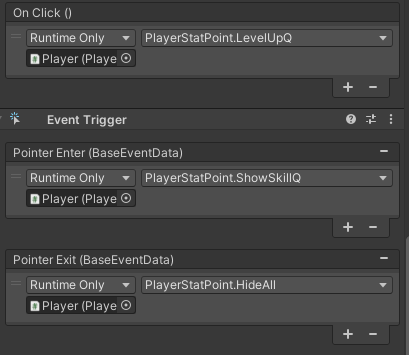
마지막으로 스킬 레벨업 버튼의 OnClick을 사용하여
스킬 레벨업 함수 LevelUpQ를 실행시켜 주며
마우스가 스킬 이미지에 올라왔을 때 / 벗어났을 때는 EventTriger의 Enter / Exit를 사용하였습니다.
스킬 레벨업 버튼과 LevelUp Text가 활성화되는 함수는 이전에 작성한 PlayerExpBar.expBarUpdate()에서 실행됩니다.
using TMPro;
using UnityEngine;
using UnityEngine.UI;
public class PlayerExpBar : MonoBehaviour
{
[SerializeField] private PlayerStats playerStats;
[SerializeField] private PlayerStatPoint playerStatPoint;
[SerializeField] private Slider playerExpBar;
[SerializeField] private TextMeshProUGUI playerLevelText;
[SerializeField] private TextMeshProUGUI playerWorldBottomExpBar;
void Start()
{
playerLevelText.text = playerStats.playerLevel.ToString();
playerWorldBottomExpBar.text = playerStats.playerLevel.ToString();
}
public void expBarUpdate(float exp)
{
playerStats.playerExp += exp;
while (playerStats.playerExp >= playerStats.playerMaxExp)
{
playerStats.playerExp -= playerStats.playerMaxExp;
playerStats.playerMaxExp *= 2;
playerStats.playerLevel += 1;
playerLevelText.text = playerStats.playerLevel.ToString();
playerWorldBottomExpBar.text = playerStats.playerLevel.ToString();
playerStats.playerStatPoint += 1;
playerStats.playerDamage += 1;
playerStatPoint.SKillLevelUpBtnPopup();
}
playerExpBar.value = playerStats.playerExp / playerStats.playerMaxExp;
}
}
감사합니다.👊